
One of my favorite quotes perfectly captures why I built Dr. Spin:
“When you are a pessimist and the bad thing happens, you live it twice. Once when you worry about it, and the second time when it happens” – Amos Tversky
It reinforces a principle I think can help improve anyone’s life: the power of positive thinking. I don’t subscribe to this mantra as some preachy self-help doctrine – I see it as a practical tool for navigating reality.
Think about it: negative news and outcomes typically fall into two camps. Either it’s something that has already happened (or inevitably will), or it’s something we can still influence through action. In both cases, dwelling on the negative only makes moving forward harder. A positive perspective1 can help you see negative news in a different light, and inspire an impactful change moving forward!
Applying this frame of mind is difficult. For some reason, we (as humans) are inclined to be more driven to negative news (and news media companies are aware of thi$). So, I created Dr. Spin to help me put a positive spin on life.
Grab your rose-colored glasses and let’s find some silver linings!
Interested in learning more about this mindset?
One of my inspirations for grounding myself in a positive mindset is by trying to remember the context of where we all live in the grand scheme of human history. The book Factfulness helps me provide that perspective. It shows that while things can be bad, they can also be getting better. There is always work to do, but use progress as inspiration for what is possible.
If you’re looking for a community where you can apply this mindset, check out r/OptimistsUnite.
Value Objective
While I’m excited about creating a tool for positive perspective-taking, I’ll admit my motivations weren’t entirely altruistic. The development process itself offered an incredible learning opportunity. The world is buzzing about GenAI and Large Language Models (LLMs) right now and this project will provide a great opportunity for me to dive deeper into this ecosystem. A part of this project, I will:
- Turn GenAI Buzz into GenAI Benefits - it seems like there is a new term, framework, or tool trending every hour related to AI. Before diving into development, I will document my understanding of the current AI ecosystem, so I can pick a technical stack that best fits Dr. Spin’s needs and understand what is out there for future use cases.
- Drill Down into LLM Model Architecture - it is a blessing and a curse, but I can’t simply implement a technology without first wanting to understand it’s inner-workings. While an out-of-the-box LLM like OpenAI’s
gpt-4o-minior Anthropic’sclaude-3-5-haiku-20241022will likely be sufficient, I will still take the time to understand how these work under the hood, so I can hopefully use some fine-tuned models in the future.
With my selfish objectives out of the way, let’s also look at the value provided by Dr. Spin as a product:
- Clear Path from Input to Good Vibes - there is a thin line for value add in the world of applications built directly on top of existing LLMs, where you are not fine-tuning the model for a specific purpose2. Why wouldn’t a user just directly interact with ChatGPT? Dr. Spin will set itself apart by having a simple user experience that gets you the new perspective you need with minimal effort.
- Positive Spins Grounded in Truth - Dr. Spin will be a good doc and try to cite his sources! Where possible, the positive perspective will not just be a pat on the back, but provide the user information that gives them confidence. Unfortunately, citing real sources is not a strength of LLMs, so I expect mixed results (with good intentions).
- Free and Open Source - as a learning project, I’m keeping everything open source and free to use (users just need their own API keys).
Requirements
Dr. Spin will be a lightweight, fun, free tool, so there is no intent to make it super feature rich. The doctor will serve a very specific purpose in a simple, straightforward manner to users. Moreover, the final product will leverage existing APIs or frameworks to allow for rapid development (which is emphasized by the Nonfunctional Requirements below). This is to allow for more time in learning the overall GenAI and LLM domain, over implementing complex, custom solutions at this time.
Functional Requirements of Dr. Spin
User Interface
Negative Inputs
- Able to submit negative inputs is any of the below formats and have it be handled appropriately by the system:
- Free form text
- Weblinks
- Documents (.pdf and .txt)
- Able to toggle if the user wants citations
- Include note that this may end up using more tokens for their API
- Able to select from zero or more attributes about the news that explains why the user finds the context negative
Positive Outputs
- Able to provide a positive spin on the input source, while considering:
- The reasons the user found the news negative
- Mitigation of hallucinations and inappropriate replies
- Able to provide citations for positive reference points with links to relevant source material
- Able to refresh the feedback based on selected negative sentiments
- Able to reset the chat
- Able to see history from previous chats in the current session
Large Language Models (LLMs)
- Users can select their preferred LLM
- Able to remember context from the current session of the user
Nonfunctional Requirements of Dr. Spin
Maintainability
- System shall be built and deployed using a technical stack that allows for rapid development and deployment with little to no maintenance costs or work
Reliability and Fault Tolerance
- System will handle potential faults of interacting with models without causing impact to the end user (i.e. running out of tokens)
Authentication
- System will provide an approach for safely using the user’s tokens for a model
Project Overview
Unraveling the world of “AI”
Before diving deep into the project, I took time to understand the current world of AI. Specifically, GenAI. There were so many buzz words flying around, I decided to document the most common ones in a post called, From Buzz to Building - Introduction to GenAI for Developers - Part 1 - Key Concepts. My anchor graphic for unraveling the world of AI divides the most common buzz words into three categories.
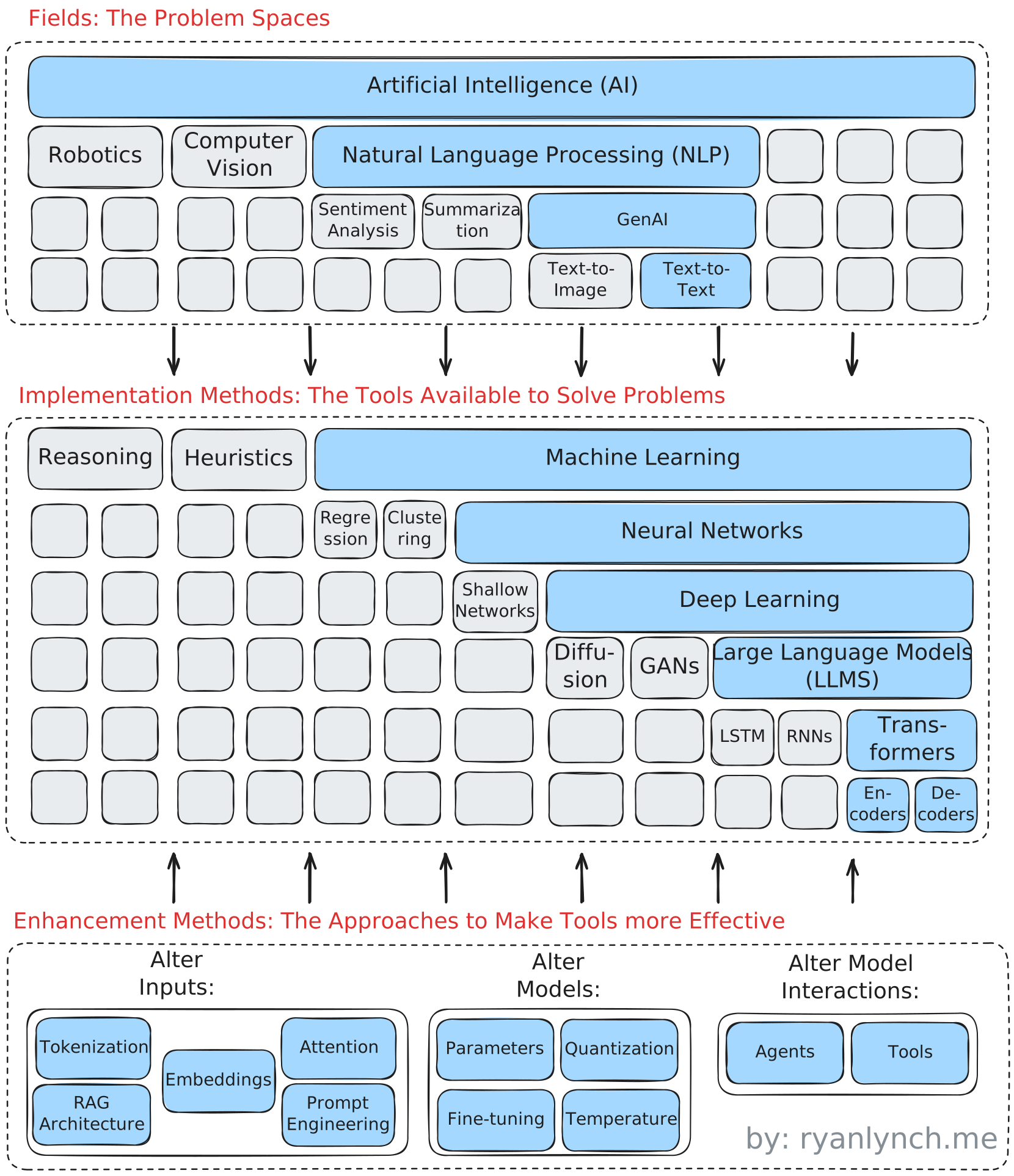
Dr. Spin’s scope mostly revolves around understanding the Implementations Methods, so we’ll take a moment to breakdown that area to ensure we are speaking the same language, but check out the source post for more details.
Now, we have some appreciation for what will “make” Dr. Spin. Let’s create a high-level architecture.
Doctor, doctor - Give me the (good) news!
 As previously mentioned, the main focus is diving into the world of LLMs, so the design is straightforward. A simple frontend with an API to generate positive spin using an LLM. The big design decisions are what facilitates building a quick (yet clean and enjoyable) frontend, and what are the options for interacting with LLMs?
Key Design Decisions and Tradeoffs
UI and Hosting
Let’s knock out the less exciting part: the UI and hosting of Dr. Spin. I considered a few options, but ultimately landed on using Streamlit.

It was pretty much a tie between Streamlit and Gradio, but I have a bit more familiarity with the former, so knew it would be quicker for me to use. Reflex and NiceGUI were interesting options, but would have distracted from my ultimate goal of working with LLMs. I plan to revisit them for future projects, though.
Interacting with Large Language Models (LLMs)
Time for the fun part! As if dissecting the AI terminology wasn’t convoluted enough, we now need to determine what makes up a GenAI technical stack. This led me to create a sequel to my earlier post, which is called From Buzz to Building - Introduction to GenAI for Developers - Part 2 - The Technical Stack. In that post, we dive into all layers of the below architecture, but Dr. Spin is a simple man. Of the LLM-specific components, we only really needed to decide what we’d like to do in the “Large Language Models (LLMs)” layer.

The theme for Dr. Spin remained consistent for this selection too - KISS (Keep It Simple, Stupid). I selected two “model providers” (option A mentioned above) and interacted with their public APIs. I selected two options that the user can pick from (the reasons below were documented in January 2025 and may have almost definitely changed):
- An “advanced” model: OpenAI‘s GPT-4 and 4o mini
- OpenAI was the pioneer in the LLM space, so I felt compelled to select at least one of their models. The GPT-4o series was one of their more advanced at the time. Also, the Dr. Spin use case wasn’t very advanced, so I selected the mini version to reduce any user costs.
- An generous free-tier: Google‘s Gemini 1.5 Flash
- I’m not sure if this has changed, but Google’s free tier was very generous at the time of development (much better than any other alternatives other than hosting locally). I haven’t checked, but I hope they did the same for Gemini 2.0.
If you’re looking to select a model for your own project, I highly recommend the website Countless.dev | AI Model Comparison.
Implementation Deep-dives
From a development standpoint, Dr. Spin was very simple and straightforward. It truly was a GenAI 101 introduction, but fun nonetheless. I did use some of the “newer” functionalities of LLM’s and have a few lessons learned to share.
Streamlit Script
First, a quick note on Streamlit. It is an excellent rapid prototyping tool, but I also understand how it does not work for advanced web applications. Other than limited customizability that comes with using a single package for UI components, the paradigm of re-running the script after every action is interesting. You need to have this at the top of mind with every line of code you write. Knowledge of Streamlit’s fragment decorators are a must prior to developing.
I am looking forward to how Streamlit continues to grow after the acquisition by Snowflake.
LLM Capabilities
Typical code takes an input and (if done correctly) spits out the same expected output every time. It is “deterministic”. With LLMs, this changes. Your input can be the same, but your output can change. It is “nondeterministic”. How can this possibly work in a production application? Users love predictability.
While the underlying of nondeterministic nature can’t be changed (it is part of what makes LLM’s so great and flexible), there are plenty of strategies that can be used to ensure consistent, quality messages from LLMs, like Dr. Spin.

Prompt Engineering
At the core of any LLM’s actions is the prompt. For Dr. Spin, we used two different types of prompts:
- System Prompt - provides high-level overarching instructions to the LLM that is considered in all subsequent queries. This is useful for applying a persona to the LLM (i.e., you are the world’s most positive therapist) and establish guardrails for what is a quality response
- User Prompt - this is the query from the user. Many applications apply query translation on the user prompt (Retrieval Augmented Generation (RAG)) to make sure the LLM gets the correct context, but I did not use this practice in Dr. Spin.
The practice of creating, tuning, and optimizing prompts is referred to as Prompt Engineering. It preaches two fundamental principles:
- Write Clear and Specific Instructions
- Use delimiters to clearly notate different portions of the prompt (“, ’, |, etc.)
- This can also help prevent prompt injection
- Ask for structured output (e.g., ask for the response in JSON)
- Ask the model to check whether certain conditions are met
- Few-shot prompting - provide examples of a successful reply to the prompt
- Use delimiters to clearly notate different portions of the prompt (“, ’, |, etc.)
- Give the Model Time to Think
- Divide the prompts into linear steps for the model to complete
- Instruct the model to work out its own solution before rushing to a conclusion
There are many strategies you can use to implement these principles. OpenAI offers a great guide on prompt engineering: OpenAI’s Prompt Engineering Guide
Function Calling
Dr. Spin now has his instructions, but how does he do his job? He wants to make as life as easy as possible and dictate how to relay information (can you imagine being bothered with formatting at a time of distress?!). How do we best make use of a free text input that may or may not contain a link?
LLM’s now have the ability to decide whether they need to call a function to complete their task! Dr. Spin can use this function calling capability to determine if there is a URL in the user’s prompt and call a web scraper function to get the information.
Unfortunately, I could not get this functionality to work in Gemini’s 1.5 Flash model3 (I’m assuming since it was a smaller model, it had difficulty with this task), but it did work for OpenAI.
First, define the function you’d like the LLM to access.
def extract_url_content(input_string: str) -> str:
    """ Extract the content of a URL from the input string to understand what is on the website.

      Args:
        input_string: The input string containing a URL.

      Returns:
        str: The content of the URL, truncated to 5000 characters.
    """
    url_pattern = re.compile(r"https?://[^\s]+")
    try:
        match = url_pattern.search(input_string)
        if not match:
            return ""
        url = match.group(0)
        response = requests.get(url, timeout=10)
        response.raise_for_status()
        soup = BeautifulSoup(response.text, "html.parser")

        # Extract readable content (simplified; can be improved)
        paragraphs = soup.find_all('p')
        content = "\n".join(p.get_text() for p in paragraphs)
        return content[:5000] # Truncate to 5000 characters to fit token limits
    except requests.exceptions.RequestException as e:
        print(f"Error fetching the webpage: {e}")
        return ""
    except Exception as e:
        print(f"Error extracting URL content: {str(e)}")
        return ""
Next, define the function as a tool the LLM can use (the concept of tools are critical to AI Agents).
def send_open_ai_chat(client, prompt) -> Optional[any]:

    extract_url_content_tool = {
            "name": "extract_url_content",
            "description": "Extract the content of a URL from the input string to understand what is on the website.",
            "parameters": {
                "type": "object",
                "properties": {
                    "url": {
                        "type": "string",
                        "description": "The URL to extract content from."
                    },
                },
            }
        }

    tools = [{
        "type": "function",
        "function": extract_url_content_tool
    }]
Send the initial messages to the LLM.
    messages = [
        {
            "role": "system", "content": SYSTEM_PROMPT
        },
        {
            "role": "user", "content": prompt
         }
    ]

    response  = client.chat.completions.create(
        model="gpt-4o-mini",
        messages=messages,
        tools=tools,
        response_format={ "type": "json_object"},
        temperature=1.7,
        frequency_penalty=1.2
    )
Check the response to see if the LLM determined a function call needs to be made, execute the function call, and continue the chat to get your final results!
if response.choices[0].message.tool_calls:

        tool_call = response.choices[0].message.tool_calls[0]
        arguments = tool_call.function.arguments
        url = json.loads(arguments).get('url')
        content = extract_url_content(url)

        function_call_result_message = [response.choices[0].message,
            {
            "role": "tool",
            "content": json.dumps({
                "url": url,
                "content": content
            }),
            "tool_call_id": response.choices[0].message.tool_calls[0].id
            }]

        messages.extend(function_call_result_message)

        response  = client.chat.completions.create(
                    model="gpt-4o-mini",
                    messages=messages,
                    response_format={ "type": "json_object"},
                    temperature=1.7,
                    frequency_penalty=1.2
                    )

    return response
JSON Output Formats
Inputs ✅. Processing ✅. Next up - outputs! Obviously, computer programs expect certain data for processing and displaying. To allow for easily using LLM outputs in other parts of your program, most LLMs allow for you to explicitly define output formats.
For example, OpenAI allows for a JSON mode to produce structured outputs. You can learn more about how to do this on OpenAI here and on Google’s Gemini here.
For Dr. Spin, this meant prescribing an output in the following format:
{
    "positive_perspective": "A detailed and empathetic response that provides a positive, fact-based outlook and actionable suggestions.",
    "negative_sentiments": "A required list of 3-5 negative sentiments either identified by the user or inferred from the context.  Include this in every repsonse.",
    "citations": "If the include_citations input is True, create a dictionary of citations with the format {citation_title: citation_url}. If citations are included, the positive_perspective should have direct quotations from the linked citation. If include_citations is false, this can be an empty dictionary."
}
The format is only defined in the system prompt, but there are methods for more robust type checking on the outputs.
Key Results
Dr. Spin performs his intended task as instructed, like a good LLM should. I spent some time playing with different prompts and seeing the results. My final prompt prioritizes a “safe” positive perspective over creativity. It aims not to validate the negative context, as much as it aims to shed a positive light. I would have loved a final version with more creativity, but couldn’t get it to work without some odd responses.
One of my goal’s for Dr. Spin was for him to be apathetic to anyone’s concerns. If an Oil Baron is talking to Dr. Spin because he is worried about electronic cars hurting his profits, I wanted Dr. Spin to understand.
This ended up being an interesting and unexpected adventure into model biases. I couldn’t convince Dr. Spin some news was “negative” news even if I told him why it bothered me. In my use case, this is no big deal, but you can see how the trained data does not produce an objective model. There is a presence of bias from the training the data.
Also, I must say the citations feature did not work out great. the desire for an LLM to “never be wrong” is too strong and reliable citations are generated, but hey are actually “hallucinations”.
The final result is a fun perspective that can hopefully shed some positive light in a world with constantly negative news. Dr. Spin is a simple ChatGPT wrapper, but it did give me a nice foray into the world of LLMs and produced something I’ll find fun to use. In the end - that’s my goal!
Tags
#blog-post #technical-project
Footnotes
-
Of course, applying a positive perspective is not about invalidating the way negative news may make someone feel. Dr. Spin addresses negative feelings, but tries to paint a brighter viewpoint. It shows how things may be bad, but also getting better. ↩
-
Fine-tuning a model is an option for Dr. Spin, but I wanted this project to be lightweight and move from concept to MVP quickly, so I can work on new projects with more robust LLM implementations. ↩
-
For the Gemini model, Dr. Spin uses a naive Regex search for detect URL’s and extracts the web content when detected. ↩